

According to the National Restaurant Association, restaurant kitchens waste 4% to 10% of the food they purchase before it ever reaches the customer’s plate. You know what that means?
When food costs already account for roughly 28% to 35% of a restaurant’s revenue, roughly 1% to 3.5% of total revenue can be lost to food waste alone before a meal is even served. And why? All because of poor inventory tracking, over-ordering, and spoilage.
In that case, the simplest way to gain better control is with an inventory spreadsheet. A restaurant inventory management Excel template helps you record stock, monitor ingredient usage, plan purchases, and identify any issues in food costs.
In this guide, you’ll get a free restaurant inventory template, learn all about types of inventory sheets and using them effectively, and understand when it’s time to move beyond spreadsheets.
What you will learn
- What’s a restaurant inventory sheet and its key components?
- Why do you need one?
- How a restaurant inventory sheet can help you run accurate stock counts.
- Why should you move from manual tracking to automated stock counts with inventory management systems?
What is a Restaurant Inventory Sheet?
A restaurant inventory sheet is a simple record of everything your restaurant keeps in stock, from ingredients and beverages to supplies and kitchen equipment. It helps you keep track of what you have on hand, what’s running low, and what needs to be reordered.
Most restaurants use inventory sheets to track item quantities, unit costs, stock received, usage, and reorder levels. You can use this sheet via Excel, Google Sheets, or inventory management software to identify food waste patterns, prevent stockouts, improve purchasing decisions, and keep food costs under control.
Types of Restaurant Inventory Sheets
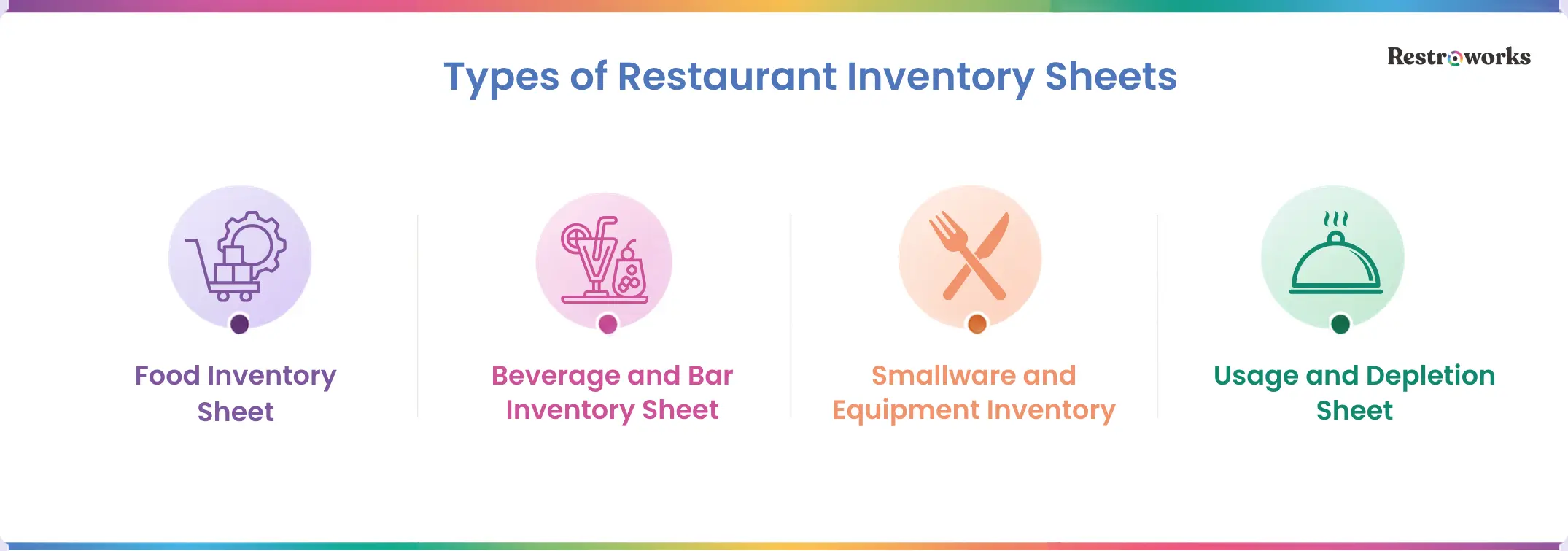
Most restaurants maintain separate inventory sheets for the following-
- Food Inventory Sheet: This tracks your raw materials such as meat, vegetables, dairy, grains, spices, frozen products, and packaged goods. You can organize them by storage location, such as dry storage, refrigerators, and freezers, for quicker and more accurate stock counts.
- Beverage and Bar Inventory Sheet: You can build a separate inventory sheet for your alcoholic and non-alcoholic beverages to monitor bottle counts, keg levels, mixers, soft drinks, and other bar supplies.
- Small Wares and Equipment Inventory: You also need to track operational assets like utensils, serving trays, cookware, storage containers, kitchen tools, and small equipment.
- Opening and Closing Inventory Sheet: These sheets record inventory levels at the beginning and end of each shift or business day. This is useful for comparing opening and closing stock to manage stock levels, wastage, pilferage, or inventory variance.
Why Do You Need Inventory Tracking?
Inventory affects almost every part of your restaurant, from food costs and purchasing to kitchen efficiency and profitability. If you don’t have a reliable tracking system, you may end up overordering, run out of key ingredients, or lose money to waste without even realizing it.
- Make smarter purchases: When you know exactly what’s in stock and how quickly it’s being used, you can order with confidence instead of relying on estimates.
- Reduce food waste: With inventory sheets, you can stay on top of stock levels and expiry dates and use ingredients before they spoil, reducing unnecessary waste and saving money.
- Control food cost: The industry average food cost is 32.4% for full-service restaurants. At such a high cost, poor inventory management can lead to overstocking, understocking, and unnecessary food waste, and directly impact these costs. Inventory sheets help ensure you buy the right quantities, reduce waste, prevent stock shortages, and keep food costs under control.
- Detect theft and shrinkage: Regular stock counts make it easier to identify missing inventory and investigate discrepancies.
- Increase profitability: Better inventory visibility means fewer emergency purchases, less shrinkage, and smarter decisions, all of which contribute to healthier profit margins.
Key Components of Restaurant Food Inventory Template
A restaurant inventory spreadsheet template is a pre-formatted spreadsheet designed to help you record, organize, and monitor your inventory in one place. So you don’t have to build a sheet from scratch; you can simply enter your stock details and use the template to track inventory levels, purchases, usage, and reorder points.
The inventory templates include the following components-
How to Use a Restaurant Inventory Sheet Template?
Once you’ve got the free inventory template, follow these steps to keep inventory records accurate and make better purchasing decisions-
1. Create a Copy of the Template
Before anything else, create a copy of the template. This will be your master file and offer the flexibility to customize it without changing the original version.
Next, customize the sheet to your restaurant. Take a few minutes to-
- Add your restaurant’s name and inventory locations.
- Remove columns you don’t need and add any that are relevant.
- Create separate tabs for food, beverages, or kitchen supplies if you want.
Basically, adjust and tailor the sheet to fit your restaurant operations. That’s the only way to make this template work for you in the most efficient way possible.
2. Build Your Item Master
Your master list of every item you want to track. This item master is the foundation of your inventory sheet, with every ingredient, supply, or raw material in it. Fill this with the components discussed earlier, such as-
- Item name and category
- Unit of measure (kg, liters, bottles, pieces, etc.)
- Cost per unit
- Supplier details
- Par level and reorder quantity
- Notes
One thing to make sure of. Don’t keep confusing names. Keep it consistent. For example, don’t record the same item as “Tomatoes,” “Fresh Tomatoes,” and “Roma Tomatoes” unless they’re actually different products.
3. Run the Stock Count
Now it’s time to record your inventory. For each item, enter the opening quantity (at the beginning of the day/week/month), purchased quantity, and the closing quantity. At the same time, update the sheet regularly, depending on how your operations work.
Some easy ways to ensure accurate counting are-
- Count inventory before opening or after closing.
- Follow the same route through your kitchen and storage every time.
- Stick to the same units of measurement to avoid inconsistencies.

4. Track Par Levels
You run out of bread during a busy service. It’s frustrating because you didn’t realize when you were short on stock. But keeping 10 extra loaves in storage at all times isn’t a smart decision either. You need to find a middle ground, and par levels help do exactly that.
Par levels tell you the minimum quantity of each item you should always have in stock. So once inventory falls below that level during your counts, you’ll know it’s time to reorder.
To set your par levels, consider how fast the kitchen uses each ingredient, the supplier schedule, and the available storage in your pantry. But also remember that par levels are not a fixed number. It’s a good idea to constantly go back and review the minimum quantities based on-
- Sales trends
- Seasonal demand
- Supplier lead times
- Storage capacity
This will make it realistic and help avoid stockout situations again.
5. Analyze Your Inventory Report
Recording inventory is only half the job. The real value comes from reviewing the data and using it to improve your operations. So every time you fill in the inventory sheet, also take the time to compare performance and costs with the previous period.
Most importantly, pay attention to metrics like inventory use, stock turnover, ingredient usage, wastage, and purchase frequency. Are you ordering certain items more often than necessary? Is inventory cost increasing without a similar rise in sales? Is actual inventory matching what your POS or sales data suggests?
These insights can help you adjust purchasing, reduce waste, and keep food costs under control.
Why Switch to a Restaurant Inventory Management Software?
A restaurant inventory spreadsheet works well when your operations are small and manageable. It’s affordable, familiar, and easy to customize. But as your menu grows, suppliers increase, and inventory requirements expand, manually updating spreadsheets becomes time-consuming and prone to counting errors.
Then, if you’re spending more time maintaining inventory than learning from it, it’s time to automate everything with inventory management software. Here are a few reasons why-
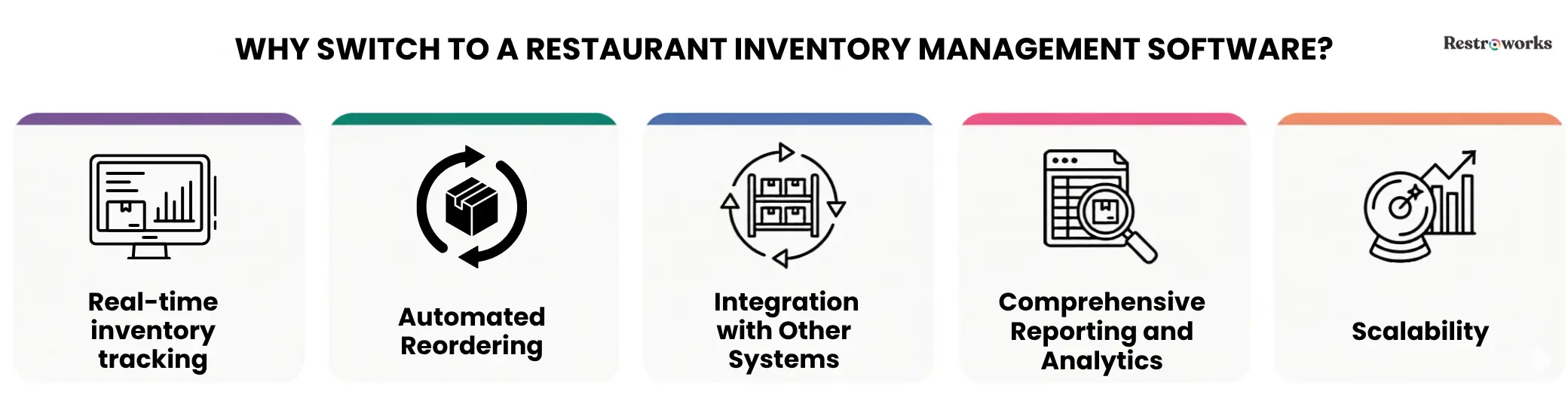
1. Real-Time Inventory Tracking
With a spreadsheet, inventory is only as accurate as the last time someone updated it. Think about it. If you sell 10 plates of pasta during lunch service but only update actual usage in the next count at the end of the day, you’re already behind.
On the contrary, restaurant inventory software updates your inventory in real time, automatically. So each time you sell a plate of pasta or a sizzler, the system will deduct the corresponding ingredient quantities from the inventory. That way, everyone will work with updated inventory counts throughout the day, instead of relying on end-of-day counts.
2. Automated Reordering
Reordering from a restaurant inventory spreadsheet usually depends on memory. Someone notices tomatoes are running low, makes a note, and puts in the purchase order, hoping to receive it in time. But that’s highly inefficient, to say the least.
With inventory management systems, you can set par levels and reorder points for every ingredient. When the item reaches that threshold, the system can alert you or even generate an automatic purchase order. No more manual counts or making last-minute purchases at higher prices.
3. Integration with Other Systems

The best thing about automating your inventory processes with software is that it connects all your tech tools together.
Inventory management software works with your POS system, forecasting tools, and purchase records to keep your inventory accurate at all times. This way, every sale on the POS automatically deducts ingredient quantities, stock levels and purchase orders are updated when deliveries arrive, and recipe mapping helps calculate ingredient usage without extra work.
The result is a smooth data flow, reduced manual data entry, and improved overall accuracy across operations. In fact, The Meridian Restaurant Group, which operates 3 full-service casual dining restaurants across the US, cut its food costs by 4.8% and saved $67,000 annually with POS-integrated inventory automation tools.
4. Comprehensive Reporting and Analytics
Working with restaurant inventory spreadsheets may seem easy and manageable until you have to apply ten different formulas and filter data just to know weekly costs or specific ingredient usage. Now, let’s be real, no restaurant owner has enough time or maybe even the mathematical skills to do that every single day.
That’s why you need software. An inventory management system generates hundreds of reports automatically. You want to check daily inventory usage? Weekly inventory cost? Wasted stock? Supplier performance? Whatever insight you need, the system will have custom reports ready for you.
So, instead of spending time organizing data, you can focus on analyzing it to make better decisions.
5. Scalable Systems
As your business grows, inventory software allows you to standardize recipes, monitor inventory across locations, control purchasing, and maintain consistent reporting.
You don’t have to rebuild your process every time you open a new restaurant. The system simply grows with you.
Restaurant Inventory Best Practices

Here are some best practices to manage restaurant inventory-
- Use the FIFO method (First In, First Out): Use your inventory sheets or software to track expiration dates and use older inventory before newer stock, especially for perishable ingredients. This reduces spoilage, minimizes waste, and helps maintain food quality.
- Follow a fixed counting schedule: Count high-value ingredients daily and perform a complete inventory count weekly, ideally before opening or after closing. Sticking to the same schedule makes it easier to compare stock levels and identify discrepancies.
- Separate kitchen and bar counts: Food and beverage inventory have different usage patterns and costs. Tracking them separately makes stock counts more organized and helps find variances faster.
- Train staff on inventory processes: Everyone should follow the same counting method, units of measurement, and recording process. Offer hands-on staff training to ensure consistency in inventory management.
- Reconcile invoices with inventory counts: Compare every invoice with the stock you’ve actually received before updating inventory records or approving supplier payments.
A restaurant inventory management Excel template is a practical starting point for organizing stock, tracking inventory, and controlling food costs. As your restaurant grows, however, manual spreadsheets can become harder to manage.
The key is to choose a system that matches your current needs while giving you the visibility to reduce waste, improve purchasing decisions, and keep your inventory under control.